A lot of yUML users want to generate diagrams programatically. The best way to do this is by POSTing your DSL text to yUML. This overcomes the problem of too much text in your URL. Here's an example with curl:
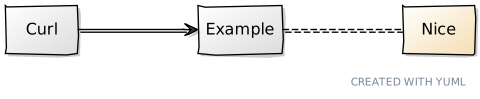
curl -X POST -d "dsl_text=[Curl]->[Example]-.-[Nice{bg:wheat}]" https://yuml.me/diagram/scruffy/class/
This returns the filename with svg extension - e3c59524.svg
You can then download with whatever extension you like (svg, png, pdf, jpg, json) like this:
curl https://yuml.me/e3c59524.png --output test.png
And you'll get a diagram that looks like this:
A few tips
- For a non-scruffy diagram,
POSTto https://yuml.me/diagram/plain/class/ or https://yuml.me/diagram/nofunky/class/ - Your DSL should be comma separated, e.g.
[Curl]->[Example]-.-[Nice{bg:wheat}],[Curl]-[Stuff] - You can register with yUML to created named diagrams with permalinks. We haven't tested
POSTing diagrams in this way for that yet.
Enjoy!